Prompt seen magical ai photo editing prompt
0
Likes
5
Views
0
Comments
Advertisement
AI Prompt Used
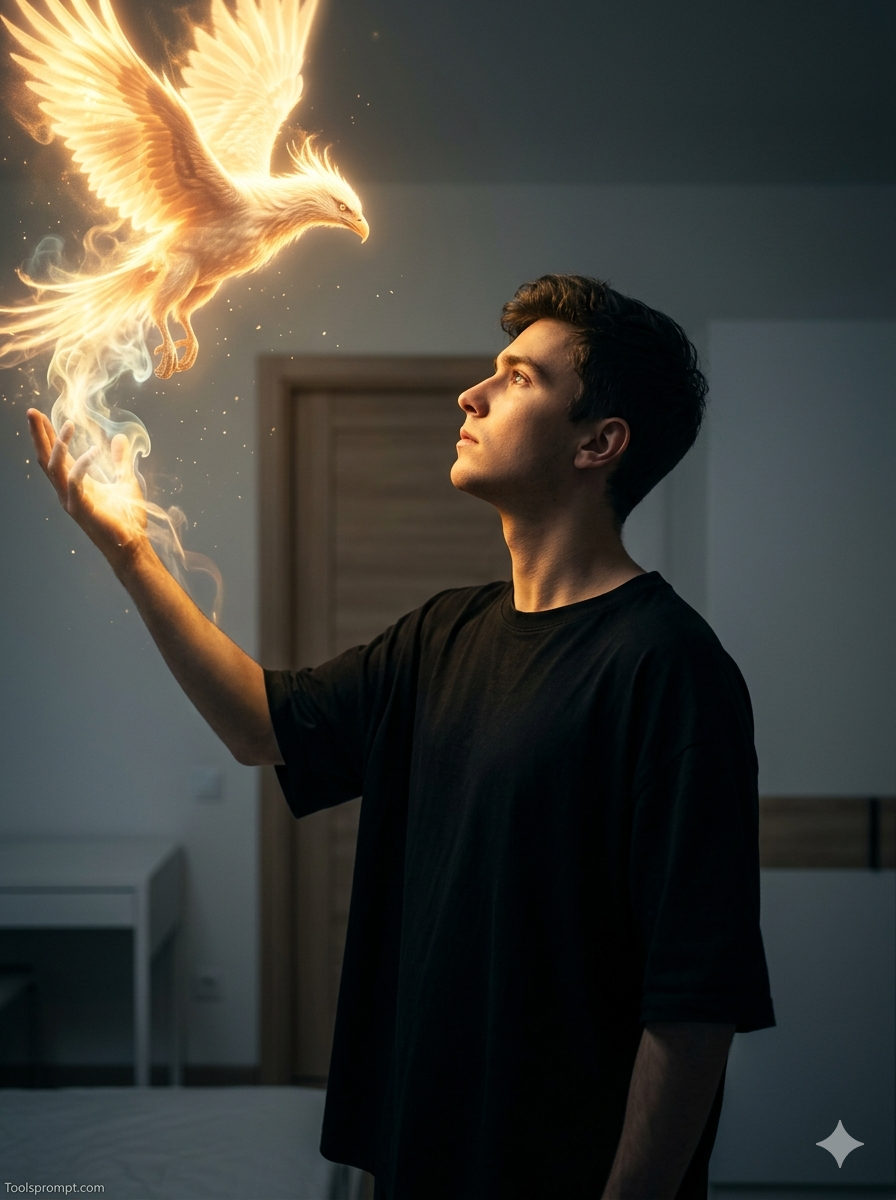
A young man (face and hair should be 100% based on the attached photo).
His expression conveys admiration, focus, and perthaps a touch of reverence.
Pose: Shown in profile, looking upward and to the left toward a luminous
figure. He extends his left hand, which becomes the apparent source of magic.
The pose emphasizes the interaction between him and the magical creature.
Environment:
A simple bedroom with light-colored walls, a wooden door, and minimal clean
-styled furniture.
Image Structure and Angle
Framing: Medium-ciose portrait, vertical orientation, capturing the model from
chest up, eaving space above for the magical effect to unfold.
Angle: The camera is at or slightly below the model's face level, creating a
natural, immersive, and intimate perspective. Composition: The visual balance
"conversation" between the subject and the creature. The subject occupies the lower
right third of the frame, while the luminous creature dominates the upper left third,
forming a diagonal harmony.
is a
The primaty element is a stream of smoke and light emanating from his hand,
transtorming into the head of an animal (the animal should be chosen based on which
fits the model best-could be reptile, bird, marine life, or mammal, large or small).
Clothing
The model wears a very loose oversized black T-shirt. Dark clothing contrasts against
the background and emphasizes the warm light iluminating his face, Lighting and
Color Analysis
Light and Shadow: The main dramatic light sOurce is diegetic, appearing to originate
from withín the scene-the magic he conjures. This warm, radiant light (yellowiwhite)
strongly illuminates the side of his face and shoulder, casting deep shadows across
his body and the room.
Calar Temperature: Strong contrast: warm goldeniorange magical light versus a cool,
desaturated environment with bluish shadows.
Saturation: High saturation in the glowing magical areas: the rest is
desaturated to maintain focus on the light effect and expression, Exposure:
Exposure is tuned to the highlights-his face and the luminous smoke-creature
plunging the rest of the environment into shadow, creating a cinematic low
-key look. Small glowing dust particles of "magic add lexture to the
darkness.
Camera and Style Parameters
(Estimated)
Lens: Portrait lens (50mm or 85mm) with wide aperture (f/1.8-/2.0),
producing shailow depth of field and soft background blur. ISO: Moderate
(400-800), cleaned in post-production for a smooth, noise-free finish.
Style: Hyper-tealistic photo with elements of dark tantasy or magical realism.
The main technique is photocomposition to integrate glowing light, smoke
effects, and the spiritual animal form
seamlessly. Signature: Toolsprompt.com. keep my tace exactly the same
as the uploaded photo.
Do not change or edit my face.
Click or tap to copy
Advertisement
About This AI Prompt
Create prompt seen by this amazing magical prompt were you can turn your ordinary photo to magical evalution form by just copy and pasting ready to use prompt.
AI Platform Comparison (32+ Models)
AI Photo Platform Comparison (32+ Models)
Choose from over 32 leading AI image platforms. Compare features, pricing, and best use cases:
| Platform | Best For | Pricing | Category | Key Strength |
|---|---|---|---|---|
| Google Imagen 3 Recommended | Photorealistic images, product visualization | Free/Paid tiers | professional | photorealistic |
| DALL-E 3 | Artistic creations, marketing visuals | Credits system | professional | prompt accuracy |
| Midjourney V6 | Digital art, concept art, fantasy | Paid subscription | artistic | artistic styles |
| Stable Diffusion 3 | Custom models, research, local generation | Free/Paid | open-source | open-source |
| Adobe Firefly Image | Commercial projects, design work | Adobe subscription | professional | commercial safe |
| Leonardo Creative | Professional art, commercial projects | Token system | professional | style consistency |
| Ideogram 2.0 | Graphic design, text-heavy images | Free/Paid | design | typography |
| Canva AI | Social media graphics, presentations | Free/Pro | design | templates |
| Playground AI V2 | Creative exploration, experimentation | Free/Paid | creative | fine-tuning |
| Runway Image Generation | Multi-modal projects, video+image | Subscription | professional | integration |
| NightCafe Creator | Artistic exploration, community engagement | Credit system | artistic | multiple algorithms |
| Wombo Dream | Mobile creation, quick art | Free/Paid | mobile | mobile |
| Getty Generative AI | Commercial use, licensed content | Paid | commercial | legal protection |
| Craiyon V3 | Quick testing, casual use | Free | free | completely free |
| Bing Image Creator | Free generation, quick results | Free | free | free DALL-E |
Quick recommendations:
- For professionals: Google Imagen 3, DALL-E 3, Midjourney V6
- For designers: Adobe Firefly, Canva AI, Leonardo Creative
- For commercial use: Getty Generative, Shutterstock AI, Adobe Firefly
- For open source: Stable Diffusion 3, SDXL, SDXL Turbo
- For free: Craiyon V3, Bing Creator, BlueWillow V4
- For mobile: Wombo Dream, StarryAI, Picsart AI
Top AI Image Generation Tools
Google Imagen 3
Google's most advanced text-to-image model with photorealistic quality
DALL-E 3
OpenAI's leading image generation model with exceptional prompt comprehension
Midjourney V6
Premium artistic image generation with unparalleled style control
Stable Diffusion 3
Latest open-source image generation with improved quality and control
Adobe Firefly Image
Adobe's commercial-safe image generation with Creative Cloud integration
Leonardo Creative
Professional art generation with style consistency
Model-Specific Optimization Tips
Model-Specific Optimization
Midjourney
- Use
--ar 16:9for widescreen,--ar 9:16for mobile --style rawfor less opinionated,--style expressivefor artistic--chaos 0-100controls variation (higher = more diverse)--stylize 100-1000adjusts artistic interpretation
Stable Diffusion
- CFG Scale: 7-12 (balance between creativity and prompt adherence)
- Sampling Steps: 20-50 (higher = more detailed but slower)
- Negative prompts: Essential for removing unwanted elements
- Use
(keyword:1.3)for emphasis,[keyword]for de-emphasis
Google Gemini/Imagen
- Use natural, conversational language
- Include context and background information
- Ask for multiple variations in one request
- Use follow-up questions for refinements
Adobe Firefly
- Specify commercial-safe content requirements
- Use Adobe Stock references for consistency
- Integrate with Creative Cloud workflows
- Use style presets for quick professional results
Runway ML / Pika
- Specify exact duration (3-10 seconds) for optimal results
- Describe camera movements: "smooth zoom", "pan left", "dolly in"
- Include motion descriptors: "fluid", "dynamic", "cinematic"
- Mention transitions between scenes for complex videos
CapCut / InVideo
- Use templates as starting points for faster production
- Combine AI generation with stock footage for variety
- Add AI voiceovers for narration and storytelling
- Export in platform-specific formats (9:16 for Reels/Shorts)
How To Use This Prompt
1
Access the Platform: Access Google Imagen 3 through Google AI Studio or Vertex AI platform.
2
Prepare Your Input: Start with a clear concept. Consider the style, composition, and mood you want to achieve.
3
Use Your Prompt: Use this prompt: "A young man (face and hair should be 100% based on the attached photo).
His expression conveys admiration, focus, and perthaps a touch of reverence.
Pose: Shown in profile, looking upward and to the left toward a luminous
figure. He extends his left hand, which becomes the apparent source of magic.
The pose emphasizes the interaction between him and the magical creature.
Environment:
A simple bedroom with light-colored walls, a wooden door, and minimal clean
-styled furniture.
Image Structure and Angle
Framing: Medium-ciose portrait, vertical orientation, capturing the model from
chest up, eaving space above for the magical effect to unfold.
Angle: The camera is at or slightly below the model's face level, creating a
natural, immersive, and intimate perspective. Composition: The visual balance
"conversation" between the subject and the creature. The subject occupies the lower
right third of the frame, while the luminous creature dominates the upper left third,
forming a diagonal harmony.
is a
The primaty element is a stream of smoke and light emanating from his hand,
transtorming into the head of an animal (the animal should be chosen based on which
fits the model best-could be reptile, bird, marine life, or mammal, large or small).
Clothing
The model wears a very loose oversized black T-shirt. Dark clothing contrasts against
the background and emphasizes the warm light iluminating his face, Lighting and
Color Analysis
Light and Shadow: The main dramatic light sOurce is diegetic, appearing to originate
from withín the scene-the magic he conjures. This warm, radiant light (yellowiwhite)
strongly illuminates the side of his face and shoulder, casting deep shadows across
his body and the room.
Calar Temperature: Strong contrast: warm goldeniorange magical light versus a cool,
desaturated environment with bluish shadows.
Saturation: High saturation in the glowing magical areas: the rest is
desaturated to maintain focus on the light effect and expression, Exposure:
Exposure is tuned to the highlights-his face and the luminous smoke-creature
plunging the rest of the environment into shadow, creating a cinematic low
-key look. Small glowing dust particles of "magic add lexture to the
darkness.
Camera and Style Parameters
(Estimated)
Lens: Portrait lens (50mm or 85mm) with wide aperture (f/1.8-/2.0),
producing shailow depth of field and soft background blur. ISO: Moderate
(400-800), cleaned in post-production for a smooth, noise-free finish.
Style: Hyper-tealistic photo with elements of dark tantasy or magical realism.
The main technique is photocomposition to integrate glowing light, smoke
effects, and the spiritual animal form
seamlessly. Signature: Toolsprompt.com. keep my tace exactly the same
as the uploaded photo.
Do not change or edit my face."
4
Customize Details: Use detailed descriptions, include lighting and composition terms
5
Generate and Refine: Generate and review results. Request variations or make specific edits as needed.
6
Finalize and Export: Download your preferred result in your chosen resolution.
Expert Tips for Best Results
- Be descriptive: Use specific, detailed language rather than vague terms
- Include artistic references: "in the style of [artist], [art movement]"
- Specify lighting and composition: "dramatic lighting, rule of thirds"
- Use quality modifiers: "highly detailed, 8k resolution, professional"
- Use weighted prompts: "(keyword:1.3)" to emphasize elements
- Experiment with different aspect ratios for various platforms
- Use negative prompts extensively to exclude unwanted elements
- Save successful seeds for consistent style reproduction
- Use image prompts with URLs for style reference
- Iterate systematically: Make small, specific changes between generations
Usage Tips
- Experiment with different art styles and mediums mentioned in the prompt
- Adjust parameters like aspect ratio, style, and quality settings
- Use style references for more consistent results
- Try varying the chaos/stylize parameters for more creative variations
- Combine with other prompts for hybrid styles
- Specify camera types and lenses for different photographic effects
- Use lighting terms like "golden hour" or "studio lighting"
- Include depth of field requirements for focus control
- Test the prompt across different AI platforms
- Keep a log of successful variations and parameters
Optimization Tips
- Use specific, descriptive language in your prompts for better AI understanding
- Include relevant keywords like 'prompt', 'seen' for targeted results
- Experiment with different parameter combinations to optimize outputs
- Save successful prompt variations for future reference and refinement
- Stay updated with the latest AI model capabilities and limitations
Advertisement
Comments
Add a Comment
No comments yet. Be the first to share your thoughts!