Editpro Tips Ai Photo Editing Prompts For Social Media Creators
0Likes
25Views
0Comments
AI Prompt Used
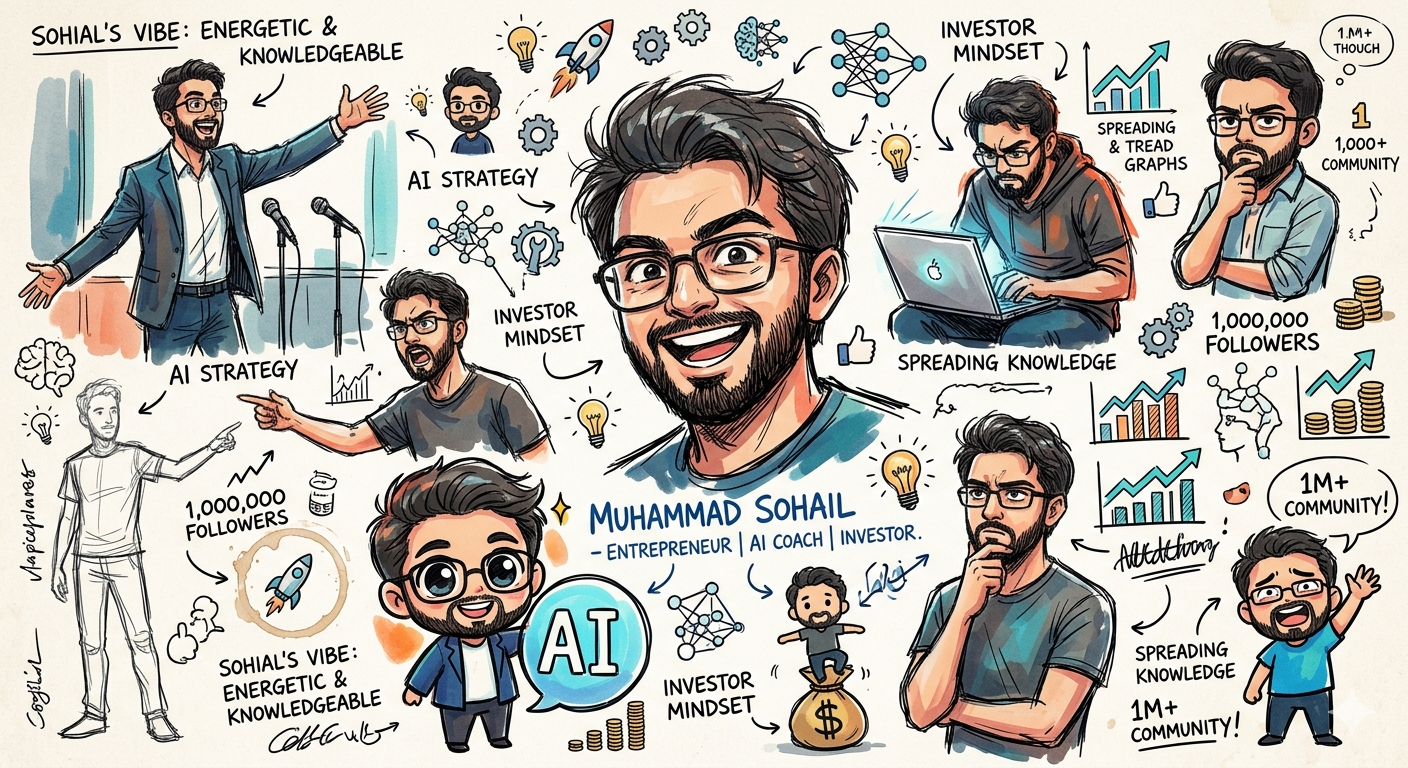
Please render the character from the image, Muhammad Sohail , as a rough doodle sketch collection.
Across the entire white-background page, freely scatter:
• Full-body poses
• Large face close-ups
• Tiny doodles
• Rough full-body sketches
• Deformed/chibi versions
…creating a page that communicates the character’s vibe and personality.
Not a clean reference sheet — think of it as a rough note page an artist casually accumulated, information-dense and sketchbook-style.
Slightly chaotic and simplified, with thick, loose hand-drawn linework. Incorporate rough anime-style drawing, vivid high-contrast colors, sloppy handwritten notes or tiny margin doodles, a subtle color palette, and broken/deformed expressions naturally tucked into the gaps.
Keep the character’s core motifs and color identity, but let the drawing style and layout be freely loose and scattered. Feel free to add any relevant details.
Character Info (fill in before generating)
Name: Muhammad Sohail
:Entrepreneur, AI Coach, Investor, Spreading Knowledge, 1,000,000 Followers
Click or tap to copy
About This AI Prompt
Editpro Tips Ai Photo Editing Prompts For Social Media Creators This prompt is perfect for any social media creator who want there audience to encourage or motivate by his strategy just copy the above prompt and access gemini through web or app and upload your photo paste the above prompt and see the result .
Comments
Add a Comment
No comments yet. Be the first to share your thoughts!