Trending Happy Holi Ai Photo Editing Prompt

Advertisement
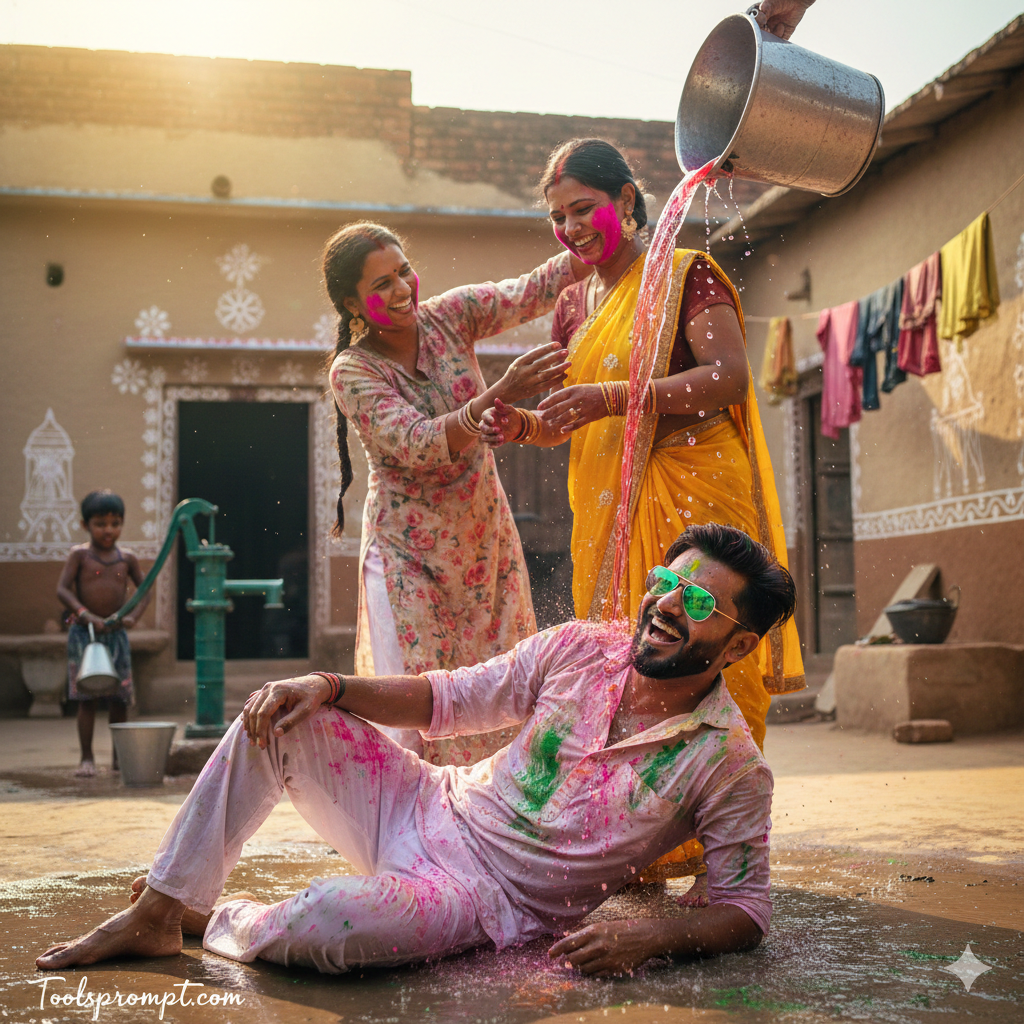
Trending Happy Holi Ai Photo Editing Prompt  - AI Generated Image

AI Prompt Used

FACE CLARITY LOCK (MAIN SUBJECT) Use the uploaded reference face for the main young man. Face must remain EXACTLY the same. Do NOT change: Facial structure Beard pattern Eye shape Skin tone Expression No beautification. No smoothing. No reshaping. Natural skin pores and real human texture must stay visible. No AI-stylized look. SCENE DESCRIPTION Ultra-realistic joyful Holi celebration in a rural Indian village courtyard. Foreground: A smiling young man wearing white cotton pants and an open white shirt now splashed with bright pink, green, and orange Holi colors. He is lying playfully on the wet mud ground, laughing, slightly propped up on one elbow. Green reflective sunglasses catching sunlight. A cheerful woman in a floral printed kurta pours a bucket of vibrant red-tinted water over him mid-action — water frozen in air with high-speed photography feel. Midground: Another man gently applying bright pink color on a woman wearing a yellow sari with traditional bangles and earrings. Their laughter visible naturally. Background: Mud-plastered village homes decorated with white hand-painted folk art patterns. A child near a hand pump playing with small metal buckets. Clothes drying on rope line. Ground fully wet with splashes of bright Holi colors blending together. LIGHTING Bright natural daylight. Warm sunlight illuminating water droplets. Soft natural shadows. Vivid yet realistic color grading. High dynamic range. No oversaturation. CAMERA & QUALITY Vertical cinematic framing. Ultra HD 8K clarity. Sharp facial focus. High-speed splash capture effect. DSLR professional photography look. Realistic depth of field. TEXT / SIGNATURE Add “Toolsprompt.com” at the bottom-left corner, HANDWRITTEN SIGNATURE-STYLE typography, thin cursive strokes, small size, subtle premium elegance, white or soft off-white color. NEGATIVE PROMPT cartoon style, CGI look, over-smooth skin, blur, low resolution, distorted anatomy, artificial glow, watermark (except signature), exaggerated color saturation. ASPECT RATIO • 3:4 vertical
Click or tap to copy
Advertisement

Discover Superior Results With The Help Following Ai Option

DALL-E 3 excels at understanding complex prompts and generating detailed, coherent images with excellent text integration. Whether you want professional-grade photography, realistic portraits, or cinematic scenes, DALL-E 3's innovative prompts enable you to control lighting, composition, camera settings, and mood with AI-powered precision. This curated collection of prompts is tailored for photographers, content creators, and visual storytellers who want more than just basic AI generation; it's for those eager to enhance photographic skills, create professional portfolios, and produce stunning visual content using DALL-E 3's advanced capabilities. Every prompt incorporates current visual trends including trending, happy, holi, blending professional photography principles with AI-enhanced creativity. DALL-E 3's sophisticated understanding capabilities turn descriptions into photorealistic images with exceptional detail and coherence.

AI Platform Comparison

AI Platform Comparison

Different AI image generators excel at different tasks. Here's how the top platforms compare for photography generation:

Platform Best For Price Complexity Quality
Dalle Recommended Realistic images, detailed scenes, text integration Credits system Low Excellent
Adobe-firefly Commercial work, Adobe integration, ethical generation Adobe subscription Medium Excellent
Stable-diffusion Custom models, local generation, advanced control Free/Paid High Good to Excellent
Clipdrop Real-world integration, practical tools, mobile use Free/Paid Low Good
Fotor Photo editing with AI, templates, easy workflow Free/Paid Low Good

Tips for choosing:

  • For beginners: Try Craiyon, BlueWillow, or Bing Image Creator
  • For professionals: Consider Leonardo AI, Adobe Firefly, or Runway ML
  • For custom work: Stable Diffusion offers the most control
  • For mobile: Wombo Dream and StarryAI have excellent apps

Top AI Tools for This Style

DALL-E 3

Excellent for realistic images, complex scenes, and text integration

realisticphotographydetailed

Adobe Firefly

Seamless Creative Cloud integration for professional designers

commercialdesignprofessional

Stable Diffusion

Open-source flexibility with extensive customization and local generation

customtechnicalopen-source

ClipDrop

Real-world integration and practical AI image tools

practicalmobilereal-world

Fotor AI

AI image generation combined with photo editing tools

editingtemplateseasy

GetImg.ai

Multiple AI models with inpainting and custom training

versatileinpaintingcustom

Model-Specific Optimization Tips

Model-Specific Optimization

Midjourney
  • Use --ar 16:9 for widescreen, --ar 9:16 for mobile
  • --style raw for less opinionated, --style expressive for artistic
  • --chaos 0-100 controls variation (higher = more diverse)
  • --stylize 100-1000 adjusts artistic interpretation
Stable Diffusion
  • CFG Scale: 7-12 (balance between creativity and prompt adherence)
  • Sampling Steps: 20-50 (higher = more detailed but slower)
  • Negative prompts: Essential for removing unwanted elements
  • Use (keyword:1.3) for emphasis, [keyword] for de-emphasis
Google Gemini
  • Use natural, conversational language
  • Include context and background information
  • Ask for multiple variations in one request
  • Use follow-up questions for refinements
Adobe Firefly
  • Specify commercial-safe content requirements
  • Use Adobe Stock references for consistency
  • Integrate with Creative Cloud workflows
  • Use style presets for quick professional results

How To Edit Your Photo Using This Prompt

1
Access the Platform: Access DALL-E 3 through ChatGPT Plus subscription or directly via the OpenAI platform.
2
Prepare Your Input: Upload your photo on respective AI . Ensure you have specific lighting, composition, and style requirements in mind.
3
Use Your Prompt: Enter your prompt in the generation field: "FACE CLARITY LOCK (MAIN SUBJECT) Use the uploaded reference face for the main young man. Face must r". Use natural language and be specific about details.
4
Customize Details: Specify style, quality, and specific details in natural language. Use "in the style of" for artistic references.
5
Generate and Refine: Click the generate button and review the created images. You can request variations or make specific edits to the generated content.
6
Finalize and Export: Select your preferred output and download in high resolution. The platform offers different quality settings for various use cases.

Expert Tips for Best Results

  • Use detailed, descriptive language rather than abstract concepts
  • Include artistic references: 'in the style of [artist], [art movement]'
  • Specify lighting and composition: 'dramatic lighting, rule of thirds'
  • Use quality modifiers: 'highly detailed, 8k resolution, professional photography'
  • Experiment with different aspect ratios for various use cases
  • Use the 'variations' feature to explore different interpretations
  • Combine with ChatGPT for iterative prompt refinement

Usage Tips

  • Specify camera types and lenses for different photographic effects
  • Use lighting terms like 'golden hour' or 'studio lighting'
  • Experiment with different film types and processing styles
  • Add compositional rules like 'rule of thirds' explicitly
  • Include depth of field requirements for focus control

Optimization Tips

  • Use specific, descriptive language in your prompts for better AI understanding
  • Include relevant keywords like 'trending', 'happy' for targeted results
  • Experiment with different parameter combinations to optimize outputs
  • Save successful prompt variations for future reference and refinement
  • Stay updated with the latest AI model capabilities and limitations
Advertisement

You Might Like:

Comments

Add a Comment

Max 1000 characters. Your comment will be publicly visible.
Note: Your email will not be published. It's only used to display your Gravatar if you have one.

No comments yet. Be the first to share your thoughts!

Quick Unique Best Match
Loading Tools Prompt...