Viral Prompt Seen Trending Girl Ai Prompt
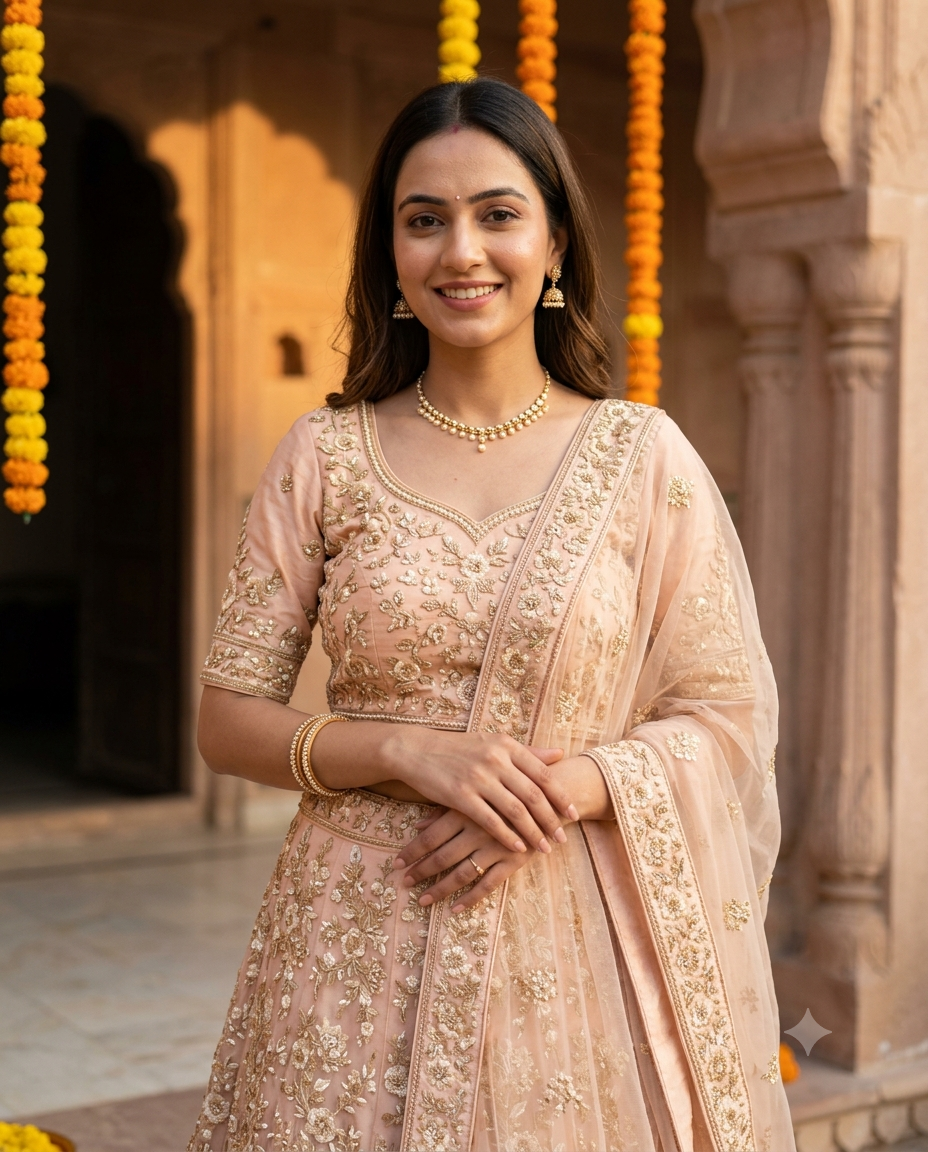
AI Prompt Used
About This AI Prompt
This Prompt Seen Girl lehenga portrait prompt transforms an uploaded adult woman photo into a stunning, realistic Indian ethnic portrait while preserving her exact facial identity. The AI places her in a warm golden-hour palace courtyard with marigold details, wearing a pastel embroidered lehenga with a soft dupatta and delicate jewelry. The result feels regal, graceful, and professionally photographed, with natural skin texture, sharp expressive eyes, and a premium 4:5 Instagram composition. The prompt’s key strengths: • Face‑preserving transformation (keeps the subject recognizable) • Realistic pastel lehenga with embroidery and soft dupatta • Warm golden-hour lighting with palace courtyard backdrop • Marigold details for an authentic Indian festive feel • Natural skin texture and sharp expressive eyes • 4:5 vertical framing ideal for Instagram and Pinterest • Strict negative prompts: no text, logos, watermark, distorted hands, or over‑smoothed skin Ideal for portrait photographers, content creators, and anyone wanting to create viral‑worthy Indian ethnic portrait edits. Works best with AI image‑to‑image platforms that support face consistency, such as Midjourney V6 (with --cref or --iw), Stable Diffusion XL (with ControlNet + IP‑Adapter), and Adobe Firefly (Generative Fill).
AI Platform Comparison (32+ Models)
AI Platform Comparison for Girl Lehenga Portraits
Compare the best AI image platforms for transforming an uploaded photo into a realistic lehenga portrait while keeping the face recognizable and avoiding over‑smoothed skin.
| Platform | Best For | Pricing | Category | Key Strength |
|---|---|---|---|---|
| Midjourney V6 Recommended | Face‑preserving image‑to‑image transformations | $10/mo | professional | --iw for image weight & --cref for face consistency |
| Stable Diffusion XL | Precise control with ControlNet and IP‑Adapter | Free/Paid | open-source | Best for exact pose and face preservation |
| Adobe Firefly | Commercial‑safe Generative Fill | Subscription | commercial | Licensed for client work & brand campaigns |
| Leonardo Creative | Image Guidance for face‑consistent edits | Token system | professional | Element weights for emphasising lehenga details |
| Google Imagen 3 | Photorealistic skin texture & natural lighting | Free/Paid | professional | Superior realism for faces and fabric textures |
| DALL‑E 3 | Text‑to‑image only (no direct image upload) | Credits | professional | Great for text‑based prompts, not for face preservation |
Quick recommendations:
- For face‑preserving edits: Midjourney V6 with
--iw 1.5and--cref - For precise control: Stable Diffusion XL with ControlNet + IP‑Adapter
- For commercial projects: Adobe Firefly (legal protection)
- For free generation: Stable Diffusion XL via Hugging Face
Top AI Image Generation Tools
Midjourney V6
Face‑preserving image‑to‑image with --iw and --cref
Stable Diffusion XL
ControlNet + IP-Adapter for exact pose and face
Adobe Firefly
Commercial‑safe Generative Fill
Leonardo Creative
Image Guidance for face‑consistent edits
Google Imagen 3
Photorealistic skin texture and soft lighting
Model-Specific Optimization Tips
Model-Specific Optimization
Midjourney V6
- Use the uploaded photo as an image prompt: paste the image URL, then add
--iw 1.5to keep the face strong. - Add
--cref [face URL] --cw 100for extra facial consistency. - Use
--ar 4:5 --style raw --v 6for vertical framing and a natural look. - Negative prompt:
--no text, logo, watermark, distorted hands, over-smoothed skin.
Stable Diffusion XL
- Use IP‑Adapter with the uploaded photo to preserve facial features.
- Use ControlNet OpenPose if you need a specific pose; otherwise rely on the original photo.
- CFG Scale: 7‑9, Steps: 30‑40, Sampler: DPM++ 2M Karras.
- Negative prompt:
text, logo, watermark, distorted hands, over-smoothed skin.
Leonardo Creative
- Use Image Guidance with the uploaded photo as the reference.
- Set Guidance Strength around 0.6–0.8 to keep the face while allowing changes.
- Add negative prompts:
text, logo, watermark, distorted hands, over-smoothed skin.
Adobe Firefly
- Use Generative Fill to replace the background and add lehenga details while keeping the subject.
- Use the “Photo” style for realistic results.
- Ensure commercial‑safe settings are on for client work.
How To Use This Prompt
Expert Tips for Best Results
- Use a high‑resolution, well‑lit portrait photo for best face preservation.
- For Midjourney, always use --iw 1.5 and --cref to keep the face recognizable.
- If the hands look distorted, add --no distorted hands to the prompt.
- Use "warm golden-hour palace courtyard" and "marigold details" to get the authentic Indian festive look.
- Specify "pastel embroidered lehenga" and "soft dupatta" so the AI changes the clothing appropriately.
- Keep the framing at 4:5 vertical for ideal social media posting.
- Generate multiple versions and composite the best face and outfit elements.
- For Stable Diffusion, use IP‑Adapter with a weight of 0.7–0.8 for good face retention.
- Add "natural skin texture, sharp expressive eyes" to ensure the expression stays realistic.
- Avoid over‑smoothing: add --no over-smoothed skin to the prompt.
Usage Tips
- Keep prompts detailed — this prompt’s charm comes from specific styling and lighting.
- Adjust aspect ratio: 4:5 for Instagram feed, 9:16 for Stories/Reels.
- Use style references for consistent colour grading.
- Try varying stylize: lower for realism, higher for artistic flair.
- Combine with colour grading prompts for unique golden‑hour looks.
- Specify camera types: "85mm lens, f/1.8" for natural portrait feel.
- Include depth of field: "shallow DOF, creamy bokeh" for professional look.
- Test the prompt across Midjourney, Stable Diffusion, and Adobe Firefly.
- Keep a log of successful parameter combinations and seeds.
- Iterate systematically: change one element at a time between generations.
Optimization Tips
- Use specific, descriptive language in prompts for better AI understanding.
- Include relevant keywords like "girl lehenga portrait", "golden-hour palace", "face preservation".
- Experiment with parameter combinations to optimize outputs for different platforms.
- Save successful prompt variations for future reference and refinement.
- Stay updated with latest AI model capabilities (Midjourney V7, DALL‑E 4, SD 3.5).
Comments
Add a Comment
No comments yet. Be the first to share your thoughts!