
Prompt Seen: Cinematic Car Stunt Backflip - AI Video Generation Prompt for Action Sequences
AI Prompt Used
About This AI Video
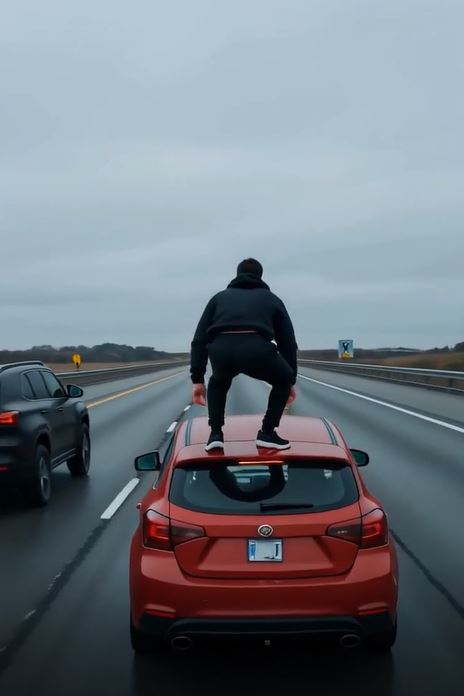
This Prompt Seen cinematic car stunt prompt is engineered for advanced AI video generation models to produce a high‑octane, realistic action sequence. It describes a complex multi‑stage stunt: a man climbing out of a moving SUV, performing a backflip between two parallel vehicles, and landing safely on the roof of a second car. The prompt includes specific details about the environment (wide highway, cloudy sky), the vehicles (black SUV, red hatchback), and the character (black shirt, blue jeans), ensuring consistency and realism. The prompt’s key strengths: • Dynamic motion and realistic physics for action scenes • Clear sequential actions that AI video models can interpret • Specific wardrobe and vehicle details for visual consistency • Cinematic framing (trailing vehicle shot) for dramatic impact • Suitable for high‑end AI video platforms like Google Veo 2, OpenAI Sora, Runway Gen‑3, and Pika 2.0 Perfect for filmmakers, content creators, and action enthusiasts who want to generate Hollywood‑style stunts without physical risk. Works best with video generation models that support complex motion and multi‑stage actions.
AI Platform Comparison (52+ Models)
AI Video Platform Comparison for Cinematic Car Stunts
Compare the best AI video generation platforms for creating realistic action stunts with moving vehicles and complex motion.
| Platform | Best For | Pricing | Category | Key Strength |
|---|---|---|---|---|
| Google Veo 2 Recommended | Photorealistic motion, complex stunts, 4K quality | Free/Paid | professional | Best for realistic physics and multi‑stage actions |
| OpenAI Sora | High‑end cinematic sequences, complex scenes | Not public | professional | Photorealistic quality and natural motion |
| Runway Gen‑3 | Professional video editing, motion brush, consistency | Subscription | professional | Advanced controls for precise motion |
| Pika 2.0 | Social media action clips, lip sync, character animation | Free/Paid | animation | Great for short, dynamic stunts |
| Luma Dream Machine | Cinematic quality, motion physics, object interaction | Credits | cinematic | Excellent for realistic car chases |
| Stable Video Diffusion | Open‑source, fine‑tuning, local generation | Free | open-source | Custom training for specific stunts |
Quick recommendations:
- For realistic stunts: Google Veo 2 or OpenAI Sora
- For social media: Pika 2.0 or Runway Gen‑3
- For cinematic quality: Luma Dream Machine
- For open source: Stable Video Diffusion
Top AI Video Editing Tools
Google Veo 2
Most advanced video generation with 4K quality and realistic physics
OpenAI Sora
State‑of‑the‑art text‑to‑video with photorealistic quality
Runway Gen‑3
Professional video generation with multi‑shot and motion brush
Pika 2.0
Advanced video generation with lip sync and character animation
Luma Dream Machine
High‑quality cinematic video with realistic motion
Stable Video Diffusion
Open‑source video generation with fine‑tuning
Video Editing Optimization Tips
Model-Specific Optimization
Google Veo 2
- Specify exact duration (3‑10 seconds) for optimal social media performance.
- Include camera movements: "trailing vehicle shot", "smooth pan".
- Use negative prompts to avoid unwanted elements like "blurry, distorted".
OpenAI Sora
- Describe camera angles, lighting, and motion style in detail.
- Use precise scene descriptions: "wide highway, cloudy sky, parallel cars".
- Specify character actions sequentially for multi‑stage stunts.
Runway Gen‑3
- Use Motion Brush to isolate the man and the cars for precise movement.
- Adjust frame consistency for smoother action sequences.
- Utilise multi‑shot feature for different angles of the stunt.
Pika 2.0
- Use
-motion 2for high‑intensity action. - Add
-ar 16:9for cinematic widescreen. - Use
-neg blur, distortion, extra limbsto avoid artifacts.
How To Create This Video
Expert Tips for Best Results
- Keep videos short (3–10 seconds) for optimal social media performance.
- Use descriptive motion language: "dynamic", "cinematic", "fluid".
- Specify transitions between scenes if combining multiple shots.
- Include camera movement directions: "trailing vehicle shot", "smooth pan".
- Mention pacing: "fast‑paced action", "slow‑motion backflip".
- Describe lighting changes throughout the sequence for dramatic effect.
- Reference popular action movie styles: "like Fast & Furious", "Mission Impossible".
- Specify output format: 16:9 for YouTube, 9:16 for Reels/Shorts.
- Include audio suggestions or mood descriptions to pair with visuals.
- Add music, captions, or effects using video editing tools for enhanced results.
Usage Tips
- Keep prompts detailed — this prompt's impact comes from specific action descriptions.
- Adjust aspect ratio: 16:9 for YouTube, 9:16 for Reels/Shorts, 1:1 for Instagram.
- Use style references for consistent color grading.
- Try varying motion intensity: higher for more dramatic stunts, lower for realism.
- Combine with sound design or music prompts for a complete experience.
- Specify camera types: "drone shot", "trailing vehicle", "handheld".
- Include depth of field: "shallow DOF, creamy bokeh" for cinematic look.
- Test the prompt across Google Veo 2, Runway Gen‑3, and Pika 2.0.
- Keep a log of successful parameter combinations and seeds.
- Iterate systematically: change one element at a time between generations.
Optimization Tips
- Use specific, descriptive language in prompts for better AI understanding.
- Include relevant keywords like "cinematic car stunt", "backflip", "action sequence".
- Experiment with parameter combinations to optimize outputs for different platforms.
- Save successful prompt variations for future reference and refinement.
- Stay updated with latest AI video model capabilities (Veo 3, Sora 2, Runway Gen‑4).
- Add alt text to generated videos for accessibility and
Comments
Add a Comment
No comments yet. Be the first to share your thoughts!