Viral Childhood Prompt Ai Photo Editing Prompt
0Likes
75Views
0Comments
AI Prompt Used
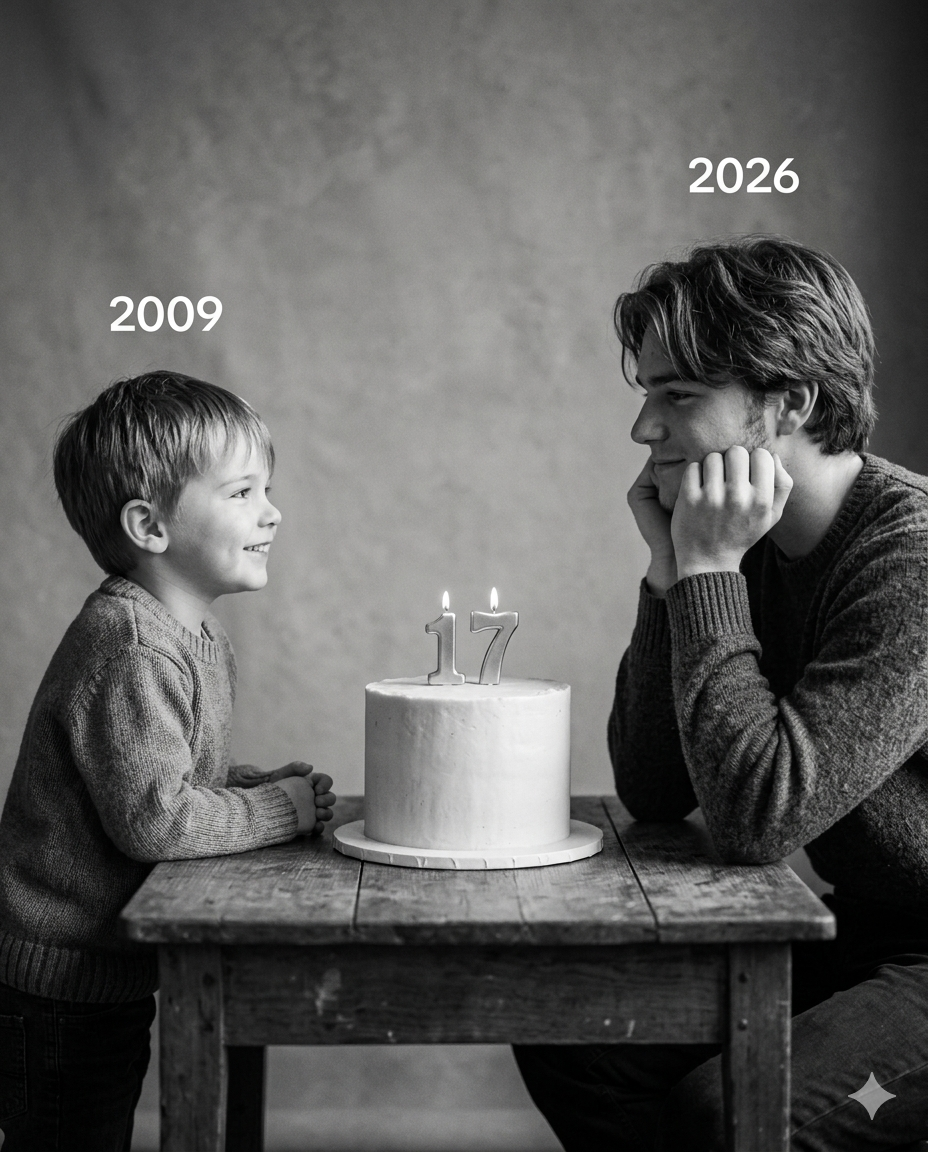
Using the images I'm going to upload to create a soft, emotional, black and white art.
Let the formation be as follows: On the left: a child version of me (from a childhood photo) looking with an innocent smile to the right, with "2009" written above it. On the right: a present version of me (from a recent photo) sits with her hands under her chin and looks at the child with a calm smile, with "2026" written above her.
In the middle: a table with a simple, elegant birthday cake with number 17 on top.
Studio background: plain and soft (studio background).
The lighting: soft, cinematic, warm (even a black-and-white photo). Style: professional, minimal,
emotional photography, focusing on feelings and visual communication between the two versions.
Make the picture look so real like a real photoshoot.
Keep my original features without changing.
Photo size: 4:5."
Click or tap to copy
About This AI Prompt
Using the right prompts can make your edits look more realistic and professional. Whether you are a boy or a girl, you can create beautiful visuals that show your journey from childhood to now. From soft emotional scenes to stylish studio edits, the possibilities are endless. In this article, you will find simple and effective childhood photo editing prompts that help you create eye-catching Then & Now images.
Comments
Add a Comment
No comments yet. Be the first to share your thoughts!