Prompt Seen: Realistic Instagram Profile + Post Composition - AI Image Prompt for Viral Social Media Mockups
AI Prompt Used
About This AI Prompt
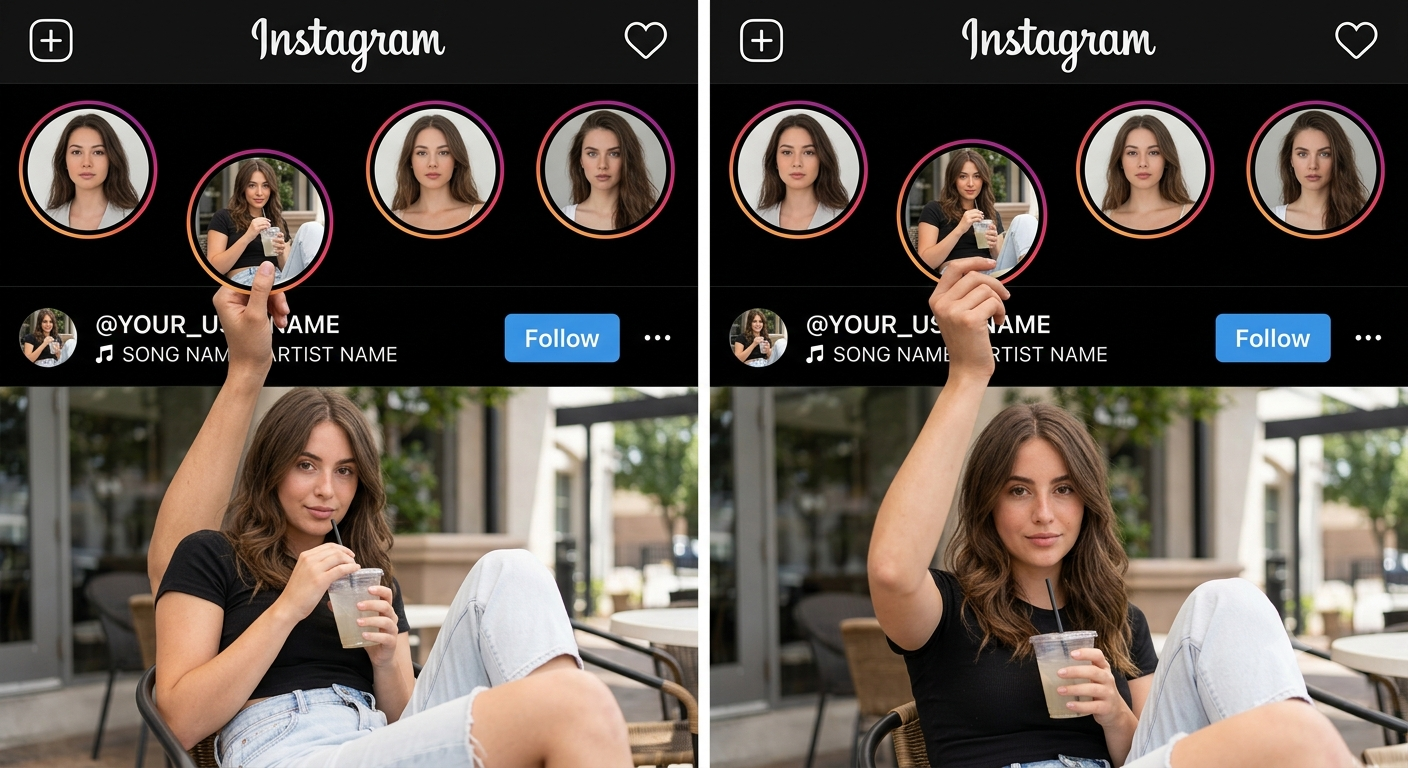
This Prompt Seen Instagram profile + post composition prompt is designed to create ultra‑realistic social media mockups where a person appears to interact with the Instagram interface itself. The prompt uses a reference image to enforce exact positioning: the main subject’s body stays inside the lower post/photo, while only one arm reaches up into the black UI area to physically hold a slightly lowered Story circle. The username and music row remain visible, and the Follow button and three‑dot menu are placed realistically. The prompt’s key strengths: • Precise layout control using a reference image • Realistic Instagram dark‑mode interface elements • Seamless hand‑to‑Story interaction with correct anatomy • Consistent identity of the main person across the post and the special Story circle • Customisable username and music text • Photorealistic lighting, skin texture, and shadows Ideal for content creators, influencers, and social media managers who want to produce viral‑worthy Instagram mockups without complex editing. Works best with image generation models that support reference images and precise composition control, such as Midjourney V6 (with --cref), DALL‑E 3 (with image upload), and Stable Diffusion XL (with ControlNet + IP‑Adapter).
AI Platform Comparison (32+ Models)
AI Platform Comparison for Instagram Mockup Compositions
Compare the best AI image platforms for creating realistic Instagram profile + post compositions with precise reference‑based layouts and hand‑to‑Story interactions.
| Platform | Best For | Pricing | Category | Key Strength |
|---|---|---|---|---|
| Midjourney V6 Recommended | Reference‑based layout with character consistency | $10/mo | professional | --cref for face identity & --ar for exact composition |
| DALL-E 3 | Accurate layout of Instagram UI & text elements | Credits | professional | Strong prompt adherence for precise positioning |
| Stable Diffusion XL | Fine‑tuning, ControlNet for pose, IP‑Adapter for identity | Free/Paid | open-source | Full control over hand‑to‑Story interaction |
| Adobe Firefly | Commercial‑safe, Creative Cloud integration | Subscription | commercial | Licensed for client work & brand campaigns |
| Leonardo Creative | Multi‑panel composition with element weighting | Token system | professional | Element weights for emphasising UI elements |
| Google Imagen 3 | Photorealistic skin texture & natural lighting | Free/Paid | professional | Superior realism for hands & interface |
Quick recommendations:
- For precise reference layout: Midjourney V6 with
--crefand--ar 9:16 - For accurate Instagram text: DALL‑E 3 (best text rendering)
- For free generation: Stable Diffusion XL via Hugging Face
- For commercial projects: Adobe Firefly (legal protection)
Top AI Image Generation Tools
Midjourney V6
Reference‑based composition with --cref for face identity
DALL-E 3
Precise layout of Instagram UI and custom text
Stable Diffusion XL
ControlNet + IP-Adapter for exact pose and identity
Adobe Firefly
Commercial‑safe with Creative Cloud integration
Leonardo Creative
Multi‑panel compositions with element weights
Google Imagen 3
Photorealistic skin texture and soft lighting
Model-Specific Optimization Tips
Model-Specific Optimization
Midjourney V6
- Use
--cref [face URL] --cw 100to keep the same person in the main photo and the special Story circle. - Add
--ar 9:16 --style raw --v 6for vertical Instagram format. - Use
--no text, logos, watermark, extra people, distorted handsto avoid unwanted elements.
DALL-E 3
- Use natural language: "Create an Instagram profile with a dark‑mode header, four Story circles, one slightly lowered, and a man whose hand holds the lowered Story circle while his body stays inside the main photo."
- Specify exact username and music text in quotes.
- Add "maintain consistent facial features and outfit across the main photo and the special Story circle."
Stable Diffusion XL
- CFG Scale: 7‑9, Steps: 30‑40, Sampler: DPM++ 2M Karras.
- Use IP‑Adapter with face image for identity consistency.
- Use ControlNet OpenPose to position the raised arm and hand precisely around the Story circle.
Google Imagen 3
- Start with: "Create a realistic Instagram profile + post composition."
- Follow up: "Make the hand physically hold the bottom of the lowered Story circle."
- Request: "Generate 4 versions with different lighting."
How To Use This Prompt
Expert Tips for Best Results
- Use a high‑resolution reference image with clear layout and lighting.
- For Midjourney, always use --cref with a clear face photo to keep identity consistent.
- Specify the exact username and song text in quotes so the AI renders them correctly.
- If the hand doesn’t touch the Story circle, add "fingers visibly grip the lower edge of the Story circle" to the prompt.
- Use negative prompts: --no floating hand, extra fingers, distorted anatomy.
- Generate multiple versions and composite the best hand and Story interaction from each.
- For DALL‑E 3, break the prompt into sections and use follow‑up messages to refine positioning.
- Add "ultra photorealistic, DSLR photography, natural skin texture" for maximum realism.
- Keep the special Story circle only slightly lowered — not in the middle of the photo.
- Ensure the person’s head and torso remain completely inside the main photo.
Usage Tips
- Keep prompts detailed — this prompt’s realism comes from precise positioning instructions.
- Adjust aspect ratio: 9:16 for Instagram Stories/Reels, 4:5 for feed posts, 1:1 for square.
- Use style references for consistent colour grading and Instagram UI style.
- Try varying chaos/stylize: lower chaos for consistency, higher for creative variations.
- Combine with lighting or colour grading prompts for unique looks.
- Specify camera types: "50mm lens, f/1.8" for natural portrait feel.
- Include depth of field: "shallow DOF, creamy bokeh" for professional look.
- Test the prompt across Midjourney, DALL‑E 3, and Stable Diffusion.
- Keep a log of successful parameter combinations and seeds.
- Iterate systematically: change one element at a time between generations.
Optimization Tips
- Use specific, descriptive language in prompts for better AI understanding.
- Include relevant keywords like "Instagram profile mockup", "Story interaction", "realistic UI".
- Experiment with parameter combinations to optimize outputs for different platforms.
- Save successful prompt variations for future reference and refinement.
- Stay updated with latest AI model capabilities (Midjourney V7, DALL‑E 4, SD 3.5).
- Add alt text to generated images for accessibility and
Comments
Add a Comment
No comments yet. Be the first to share your thoughts!