
Prompt Seen: Realistic Instagram Profile + Post Composition (Female) - AI Image Prompt for Viral Social Media Mockups
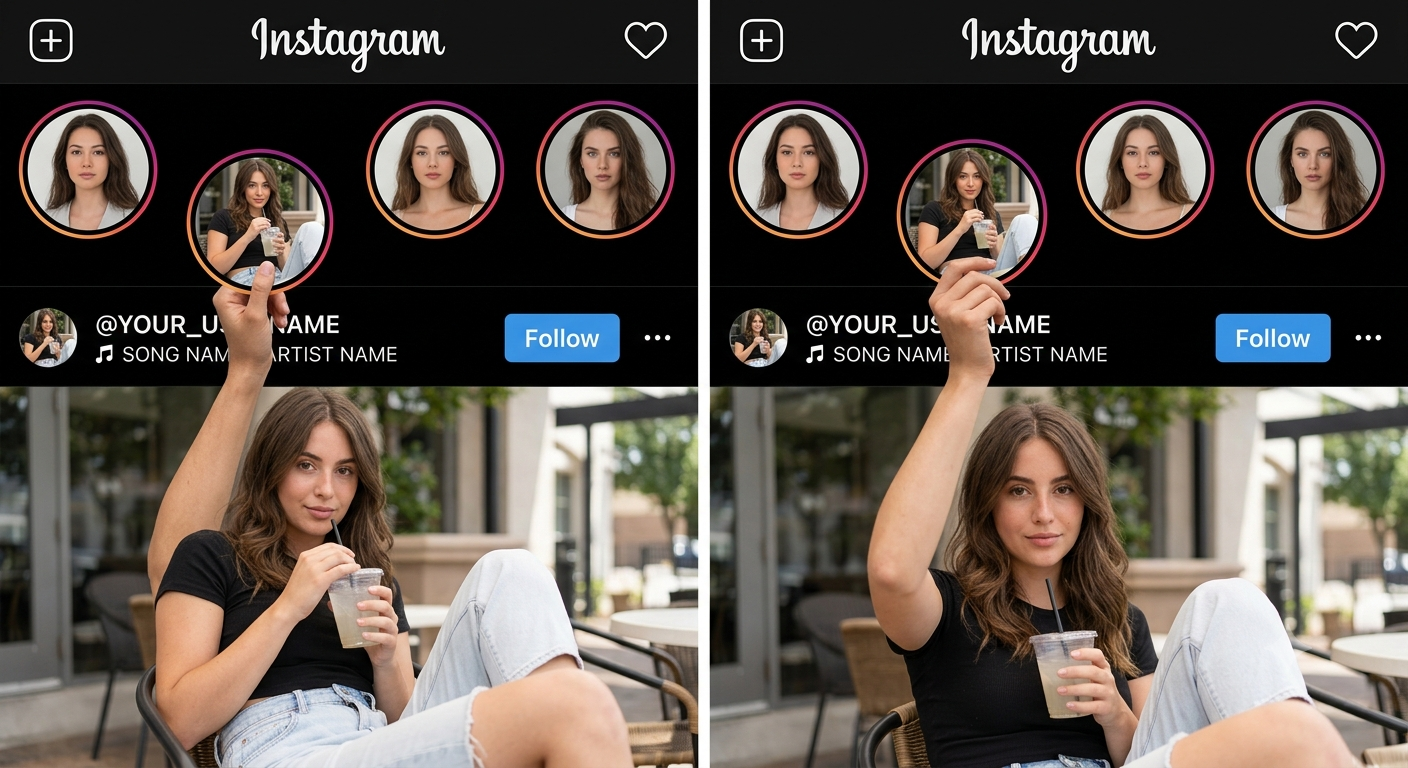
Prompt Seen: Realistic Instagram Profile + Post Composition (Female) - AI Image Prompt for Viral Social Media Mockups - AI Generated Image

AI Prompt Used

Create a highly realistic Instagram profile + Instagram post composition using the uploaded reference image as the EXACT visual reference for layout, positioning, proportions and interaction. IMPORTANT: Study the uploaded reference image carefully before generating. Recreate the same visual concept and positioning. The main FEMALE PERSON must remain inside the lower Instagram post/photo. Only one raised arm and hand should extend upward into the black Instagram UI area to physically hold the slightly lowered Story circle. Do NOT move the Story circle too far downward. Do NOT place the entire woman over the Instagram interface. ━━━━━━━━━━━━━━━━━━━━ 1. INSTAGRAM HEADER ━━━━━━━━━━━━━━━━━━━━ Create a realistic Instagram dark-mode interface at the top. Include: - Instagram wordmark at the top center - Plus (+) icon at the upper left - Heart/notification icon at the upper right - Black/dark Instagram background - Authentic Instagram-style typography - Realistic spacing and proportions - Clean and believable Instagram UI ━━━━━━━━━━━━━━━━━━━━ 2. STORY ROW ━━━━━━━━━━━━━━━━━━━━ Create FOUR circular Instagram Story thumbnails. Three Story circles must remain aligned normally in one horizontal row. The SECOND Story circle is the special Story circle. Move ONLY this second Story circle slightly downward from the normal Story row. IMPORTANT: Do NOT move it far downward. Its position must remain close to the original Story row. The bottom portion of the special Story circle should reach approximately the username/music area, matching the uploaded reference. It should NOT extend deeply into the main photograph. It should NOT cover the woman's body. It should look like the Story circle has been slightly pulled down from the Story row. ━━━━━━━━━━━━━━━━━━━━ 3. SPECIAL STORY CIRCLE ━━━━━━━━━━━━━━━━━━━━ Inside the special Story circle, use the SAME FEMALE PERSON from the uploaded reference photo. Show the same woman sitting casually and holding a transparent cold drink with a straw. Preserve her identity exactly: - same face - same facial structure - same skin tone - same hairstyle - same recognizable facial features - same natural body proportions Do NOT create a different woman. Do NOT change her facial identity. The Story photo must look like a natural realistic photograph. ━━━━━━━━━━━━━━━━━━━━ 4. HAND HOLDING THE STORY CIRCLE ━━━━━━━━━━━━━━━━━━━━ This is the main visual interaction. The MAIN FEMALE PERSON is located inside the large photograph below. Her complete body must remain inside the lower photograph. ONLY ONE ARM / FOREARM / HAND should extend upward from the photograph into the black Instagram UI area. The arm should naturally travel upward toward the slightly lowered Story circle. The hand must physically HOLD the bottom edge of the special Story circle. The fingers must visibly touch and naturally grip the lower edge of the circular Story frame. The thumb and fingers must have realistic anatomy and positioning. Do NOT make the hand point toward the Story. Do NOT leave a gap between the hand and Story circle. Do NOT make the hand float. Do NOT put the woman's head or torso into the Instagram UI. The visual impression must clearly be: The woman is inside the Instagram post and has raised one hand upward to physically hold the Story circle. ━━━━━━━━━━━━━━━━━━━━ 5. CRITICAL USERNAME + SONG POSITION ━━━━━━━━━━━━━━━━━━━━ THIS IS VERY IMPORTANT. The username and music/song information must be positioned BELOW THE HAND. The hand must NOT cover, cut through, overlap or hide the username or song text. The hand should be ABOVE the username/music text. Correct visual order: SPECIAL STORY CIRCLE ↓ HAND ↓ USERNAME / SONG TEXT ↓ MAIN INSTAGRAM PHOTO The username and song row must remain clearly visible underneath the hand. Do NOT place text on top of the hand. Do NOT place text behind the hand. Do NOT let the hand cut through the username. Do NOT let the hand cut through the song title. Do NOT hide any important part of the username or song behind fingers. There must be a small natural amount of spacing between the bottom of the hand and the username/music text so the text remains clean and readable. The hand can be close to the text, just like the reference, but the text must remain BELOW the hand and completely readable. ━━━━━━━━━━━━━━━━━━━━ 6. USERNAME ━━━━━━━━━━━━━━━━━━━━ Display the customizable username: @YOUR_USERNAME The username must remain exactly as provided by the user. Do NOT generate a random username. Use realistic Instagram-style white typography. Place the username below the raised hand. Keep the complete username visible. The fingers must NOT overlap any letter. ━━━━━━━━━━━━━━━━━━━━ 7. MUSIC / SONG INFORMATION ━━━━━━━━━━━━━━━━━━━━ Below or directly beside the username, show realistic Instagram music information. Example: 🎵 SONG NAME • ARTIST NAME Generate a natural-looking song title and artist name. The music text must also be BELOW THE HAND. The hand must NOT overlap or cover the song text. Keep the song title and artist readable. Make it look like genuine Instagram music/audio information. ━━━━━━━━━━━━━━━━━━━━ 8. FOLLOW BUTTON ━━━━━━━━━━━━━━━━━━━━ Place a realistic Instagram-style Follow button on the right side of the username/music area. Also include a realistic three-dot menu icon. Keep these elements positioned similarly to the uploaded reference. The Follow button must not interfere with the raised hand. ━━━━━━━━━━━━━━━━━━━━ 9. MAIN INSTAGRAM POST / PHOTOGRAPH ━━━━━━━━━━━━━━━━━━━━ Below the Instagram UI area, create the MAIN PHOTOGRAPH. The lower photograph must look like an actual Instagram post. The main female person's complete body must remain INSIDE this photograph. Her: - head - shoulders - torso - legs/body must remain within the lower photograph area. Only her raised arm, forearm and hand may extend upward into the black Instagram UI. Do NOT place her entire body above the photograph boundary. Do NOT make her stand on top of the Instagram interface. Do NOT make her appear behind the Story row. ━━━━━━━━━━━━━━━━━━━━ 10. MAIN FEMALE PERSON IDENTITY ━━━━━━━━━━━━━━━━━━━━ Use the SAME FEMALE PERSON from the uploaded reference photo. Preserve: - exact facial identity - facial structure - skin tone - hairstyle - recognizable features - natural body proportions Do not face-swap. Do not replace her with another woman. Do not excessively beautify or alter her face. Keep the woman realistic and recognizable. Her pose should naturally allow one arm to reach upward and hold the Story circle. ━━━━━━━━━━━━━━━━━━━━ 11. OTHER STORY CIRCLES ━━━━━━━━━━━━━━━━━━━━ The other Story circles should contain completely different randomly generated AI images. Story 1: Random realistic/aesthetic female profile image. Story 3: Random anime/illustration-style female image. Story 4: Another random realistic or anime-style female profile image. Do NOT use the main woman's identity in these random Story images. They should look like different Instagram users. ━━━━━━━━━━━━━━━━━━━━ 12. EXACT SPATIAL RELATIONSHIP ━━━━━━━━━━━━━━━━━━━━ Follow this exact hierarchy: TOP: Instagram header ↓ NORMAL STORY ROW: Three normal Story circles ↓ SPECIAL STORY: One Story circle slightly lower than the others ↓ SPECIAL STORY CIRCLE: Ends around the username/music area ↓ HAND: Main woman's hand comes up from the lower photograph and holds the Story circle ↓ USERNAME + SONG: Username and song are positioned BELOW the hand ↓ MAIN PHOTO: The woman's entire body remains inside the photograph IMPORTANT: The hand must NEVER cover the username or song. The text must NEVER be printed over the hand. The hand must NEVER cut through the text. The username and song must appear clearly BELOW the hand. ━━━━━━━━━━━━━━━━━━━━ 13. REALISM AND ANATOMY ━━━━━━━━━━━━━━━━━━━━ Ultra photorealistic. Professional DSLR photography. Natural skin texture. Realistic lighting. Realistic shadows. Accurate perspective. Correct female hand anatomy. Correct fingers. Natural thumb placement. Realistic contact between fingers and Story frame. Natural depth of field. High-resolution details. Authentic Instagram interface. No plastic skin. No distorted face. No distorted hands. No extra fingers. No missing fingers. No extra arms. No extra limbs. No duplicate person. No floating hand. No floating Story circle. No unnatural body position. ━━━━━━━━━━━━━━━━━━━━ 14. FINAL REFERENCE-MATCHING INSTRUCTION ━━━━━━━━━━━━━━━━━━━━ The final image should closely reproduce the uploaded reference's visual concept. The Story circle should be ONLY SLIGHTLY LOWER than the normal Story row. The main female person should remain INSIDE the lower Instagram photograph. Only her raised arm and hand should enter the black Instagram UI. Her hand should physically hold the bottom of the special Story circle. The username and song information must be BELOW the hand. The hand must NOT cover, cut or overlap the username or song. Keep the username and song fully readable. The final result should look like a seamless real Instagram post where the woman has physically reached upward from her photograph, grabbed one Instagram Story circle, and is holding it naturally — while the username and music information remain cleanly visible underneath her hand. Do not simplify the composition. Do not change the positioning. Do not move the Story circle excessively downward. Do not put the woman's body into the Instagram UI. Only her arm and hand should extend into the UI.
Click or tap to copy

About This AI Prompt

This Prompt Seen Instagram profile + post composition prompt (female version) creates ultra‑realistic social media mockups where a woman appears to physically interact with the Instagram interface. Using a reference image to enforce exact positioning, the main subject’s body stays inside the lower post/photo, while only one arm reaches up into the black UI area to hold a slightly lowered Story circle. Crucially, the username and music row are positioned clearly below the hand, ensuring they remain fully visible and readable. The prompt’s key strengths: • Precise layout control using a reference image • Realistic Instagram dark‑mode interface elements • Seamless hand‑to‑Story interaction with correct female hand anatomy • Consistent identity of the main woman across the post and the special Story circle • Customisable username and music text • Strict spatial rules so the hand never covers the username or song • Photorealistic lighting, skin texture, and shadows Ideal for content creators, influencers, and social media managers who want to produce viral‑worthy Instagram mockups without complex editing. Works best with image generation models that support reference images and precise composition control, such as Midjourney V6 (with --cref), DALL‑E 3 (with image upload), and Stable Diffusion XL (with ControlNet + IP‑Adapter).

AI Platform Comparison (32+ Models)

AI Platform Comparison for Instagram Mockup Compositions (Female)

Compare the best AI image platforms for creating realistic Instagram profile + post compositions with precise reference‑based layouts and hand‑to‑Story interactions, while keeping the username and song text visible below the hand.

Platform Best For Pricing Category Key Strength
Midjourney V6 Recommended Reference‑based layout with character consistency $10/mo professional --cref for face identity & --ar for exact composition
DALL-E 3 Accurate layout of Instagram UI & text elements Credits professional Strong prompt adherence for precise positioning
Stable Diffusion XL Fine‑tuning, ControlNet for pose, IP‑Adapter for identity Free/Paid open-source Full control over hand‑to‑Story interaction and text placement
Adobe Firefly Commercial‑safe, Creative Cloud integration Subscription commercial Licensed for client work & brand campaigns
Leonardo Creative Multi‑panel composition with element weighting Token system professional Element weights for emphasising UI elements
Google Imagen 3 Photorealistic skin texture & natural lighting Free/Paid professional Superior realism for hands & interface

Quick recommendations:

  • For precise reference layout: Midjourney V6 with --cref and --ar 9:16
  • For accurate Instagram text: DALL‑E 3 (best text rendering)
  • For free generation: Stable Diffusion XL via Hugging Face
  • For commercial projects: Adobe Firefly (legal protection)

Top AI Image Generation Tools

Midjourney V6

Reference‑based composition with --cref for face identity

Social media mockups, viral posts $10/mo

DALL-E 3

Precise layout of Instagram UI and custom text

Editorial mockups, Pinterest Credits

Stable Diffusion XL

ControlNet + IP-Adapter for exact pose and identity

Custom character models Free/Paid

Adobe Firefly

Commercial‑safe with Creative Cloud integration

Client work, brand campaigns Subscription

Leonardo Creative

Multi‑panel compositions with element weights

Professional social media art Token system

Google Imagen 3

Photorealistic skin texture and soft lighting

High‑end photorealistic output Free/Paid

Model-Specific Optimization Tips

Model-Specific Optimization

Midjourney V6
  • Use --cref [face URL] --cw 100 to keep the same woman in the main photo and the special Story circle.
  • Add --ar 9:16 --style raw --v 6 for vertical Instagram format.
  • Use --no text, logos, watermark, extra people, distorted hands to avoid unwanted elements.
  • To ensure the hand does not cover text, add: "hand is above username, username below hand".
DALL-E 3
  • Use natural language: "Create an Instagram profile with a dark‑mode header, four Story circles, one slightly lowered, and a woman whose hand holds the lowered Story circle while her body stays inside the main photo. The username and song text must be clearly visible below her hand."
  • Specify exact username and music text in quotes.
  • Add "maintain consistent facial features and outfit across the main photo and the special Story circle."
Stable Diffusion XL
  • CFG Scale: 7‑9, Steps: 30‑40, Sampler: DPM++ 2M Karras.
  • Use IP‑Adapter with face image for identity consistency.
  • Use ControlNet OpenPose to position the raised arm and hand precisely around the Story circle, and use inpainting to place the username/song text below the hand.
Google Imagen 3
  • Start with: "Create a realistic Instagram profile + post composition with a female subject."
  • Follow up: "Make the hand physically hold the bottom of the lowered Story circle, and place the username and song text clearly below the hand."
  • Request: "Generate 4 versions with different lighting."

How To Use This Prompt

1
Access Midjourney V6 via Discord, DALL‑E 3 via ChatGPT Plus, or Stable Diffusion XL via DreamStudio/Hugging Face.
2
Upload the reference image that shows the exact composition you want.
3
For Midjourney, copy the public URL of your reference and add --cref [URL] --cw 100 to the prompt.
4
Copy the complete Instagram profile + post composition prompt exactly as provided.
5
Replace @YOUR_USERNAME and the song placeholder with your desired text.
6
Paste the prompt into your chosen AI platform and add platform‑specific parameters.
7
Generate 4 initial variations and select the one with the best hand‑to‑Story interaction and layout.
8
Ensure the username and song text are fully visible below the hand.
9
Refine specific elements (username text, music row, Follow button) and export in high resolution.

Expert Tips for Best Results

  • Use a high‑resolution reference image with clear layout and lighting.
  • For Midjourney, always use --cref with a clear face photo to keep identity consistent.
  • Specify the exact username and song text in quotes so the AI renders them correctly.
  • If the hand covers the username, add "hand is above username, text below hand" to the prompt.
  • Use negative prompts: --no floating hand, extra fingers, distorted anatomy, hand covering text.
  • Generate multiple versions and composite the best hand and Story interaction from each.
  • For DALL‑E 3, break the prompt into sections and use follow‑up messages to refine positioning.
  • Add "ultra photorealistic, DSLR photography, natural skin texture" for maximum realism.
  • Keep the special Story circle only slightly lowered — not in the middle of the photo.
  • Ensure the woman’s head and torso remain completely inside the main photo.

Usage Tips

  • Keep prompts detailed — this prompt’s realism comes from precise positioning instructions.
  • Adjust aspect ratio: 9:16 for Instagram Stories/Reels, 4:5 for feed posts, 1:1 for square.
  • Use style references for consistent colour grading and Instagram UI style.
  • Try varying chaos/stylize: lower chaos for consistency, higher for creative variations.
  • Combine with lighting or colour grading prompts for unique looks.
  • Specify camera types: "50mm lens, f/1.8" for natural portrait feel.
  • Include depth of field: "shallow DOF, creamy bokeh" for professional look.
  • Test the prompt across Midjourney, DALL‑E 3, and Stable Diffusion.
  • Keep a log of successful parameter combinations and seeds.
  • Iterate systematically: change one element at a time between generations.

Optimization Tips

  • Use specific, descriptive language in prompts for better AI understanding.
  • Include relevant keywords like "Instagram profile mockup", "Story interaction", "realistic UI".
  • Experiment with parameter combinations to optimize outputs for different platforms.
  • Save successful prompt variations for future reference and refinement.
  • Stay updated with latest AI model capabilities (Midjourney V7, DALL‑E 4, SD 3.5).
  • Add alt text to generated images for accessibility and SEO.
  • Use structured data (ImageObject schema) on prompt pages.
  • Include canonical URLs for prompt pages.
  • Cross-link related prompts for internal linking.
  • Update regularly to maintain freshness signals.

You Might Like:

Comments

Add a Comment

Max 1000 characters. Your comment will be publicly visible.
Note: Your email will not be published.

No comments yet. Be the first to share your thoughts!

Follow on Insta Subscribe On YT Join Whatsapp
Uploaded preview
5s
0 credits
Generated Image

Community

Have a prompt idea? Share it with the community!

Edit Prompt Page

Title

Preview Image

Upload a new image to replace the current one (JPEG / PNG / WebP, max 5MB). Leave empty to keep current. preview

About This AI Prompt

Description shown in the "About This Prompt" section.

AI Platform Comparison (HTML)

Advanced users: paste custom HTML for the platform comparison table. Leave empty to use the auto-generated version.

Top AI Tools

One tool per line: Name | Description | Best For | Price

Model-Specific Optimization Tips (HTML)

Custom HTML for the model-specific tips section. Leave empty to use the auto-generated version.

How To Use This Prompt

One step per line. Line breaks will be converted into numbered steps.

Expert Tips for Best Results

One tip per line.

Usage Tips

One tip per line.

Optimization Tips

One tip per line.