Travelling In Paris Ai Photo Editing Prompt

Advertisement
Advertisement
Advertisement
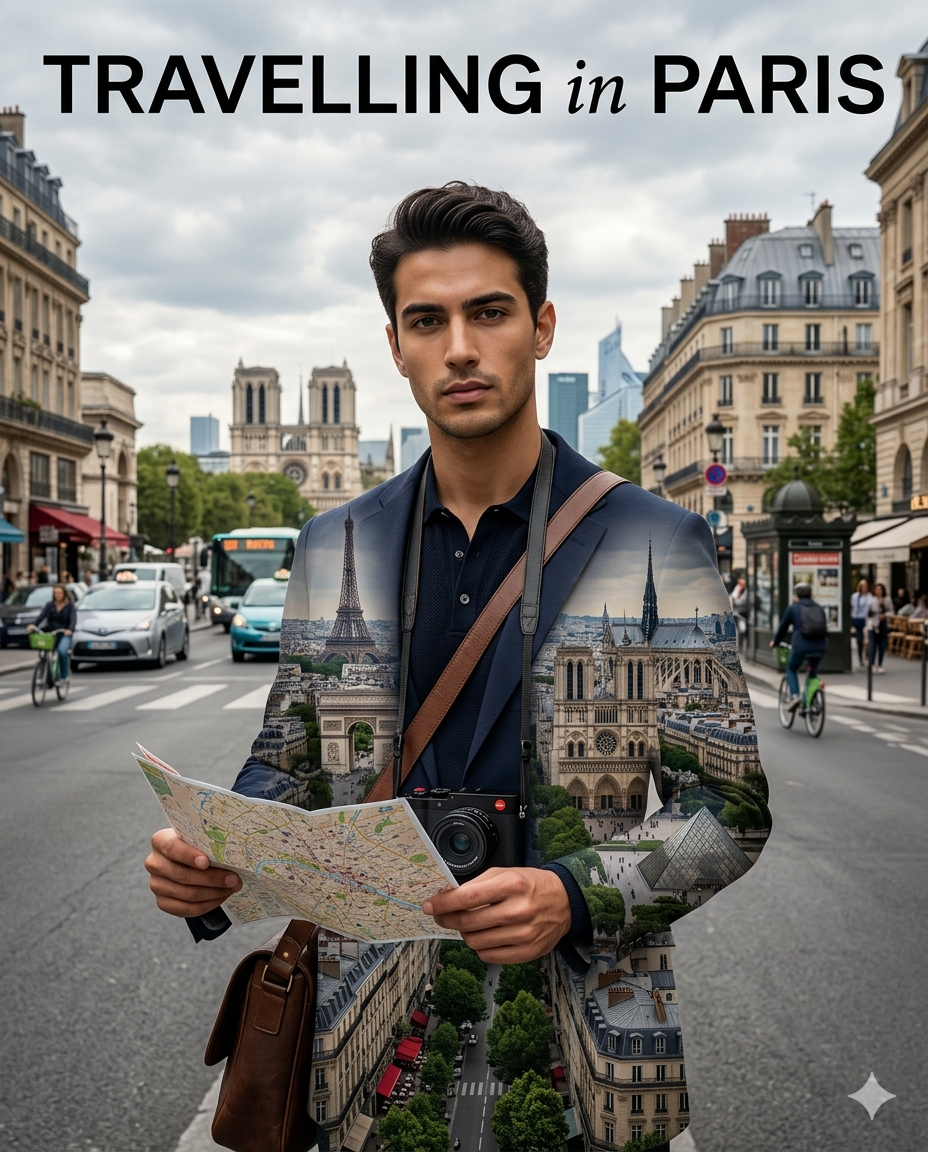
Travelling In Paris Ai Photo Editing Prompt  - AI Generated Image
AI Prompt Used

Use the reference image with maximum fidelity, preserving exactly the facial features, skin tone, complexion, hairstyle and expression of the person, without altering their identity. Create a hyperrealistic editorial photo composition deluxe cinematic travel poster style inspired by “travel around the city”. The person appears in the center of the image holding an open tourist map of the chosen city, looking at the camera with a serious and elegant expression. You can wear modern shades, premium casual wear, or sophisticated urban style, plus a pro-hanging camera and a cross-the-shoulder traveler strap. The composition must artistically and surrealistically integrate the city within the clothes and the person's body using an ultra detailed double exposure effect. Inside the torso and the attire appear perfectly merged the monuments, avenues, historical architecture and skyscrapers of the selected city. In the background there is a realistic street full of urban life: light traffic, public transport, pedestrians, cyclists and cultural elements representative of the place. Architecture must blend historical and modern areas to create cinematic visual depth. The scene must have slightly perspective from below, soft natural cloudy afternoon lighting, depth of professional field, realistic shadows and extremely detailed textures. Estilo visual: cinematic hyperrealism travel poster premium editorial of luxury magazine double art exhibit clean and modern composition ultra detailed dslr 8k realistic textures of skin, clothes and city natural colors with cinematic contrast Large text at the top: "TRAVELLING in the PARIS" Typography black minimalist modern international editorial style. Vertical 4:5 or 9:16 format, ultra HD quality, perfect blend of portrait and urban landscape, contemporary luxury travel style. The composition must work perfectly for both men and women without losing elegance, realism or visual impact. Use the reference image with maximum fidelity, preserving exactly the facial features, skin tone, complexion, hairstyle and expression of the person, without altering their identity.
Click or tap to copy
Advertisement
Advertisement
Advertisement

About This AI Prompt

The Travelling in Paris AI Photo Editing Prompt is a romantic, wanderlust-filled trend where users transform their ordinary travel photos into stunning Parisian dreamscapes. Using Google Gemini or similar AI tools, people upload their selfies or travel photos and paste prompts like "transform my photo into a dreamy Paris travel scene — Eiffel Tower in soft focus background, me walking on charming cobblestone street, vintage lamp posts, chestnut trees in bloom, warm golden sunset lighting, romantic Parisian atmosphere, my face preserved, 4K, travel photography aesthetic" . The AI generates breathtaking images that capture the magic of the City of Light — perfect for travel memories, dream vacation content, and "wish you were here" posts.
AI Platform Comparison (32+ Models)

AI Photo Platform Comparison (32+ Models)

Choose from over 32 leading AI image platforms. Compare features, pricing, and best use cases:

Platform Best For Pricing Category Key Strength
Google Imagen 3 Recommended Photorealistic images, product visualization Free/Paid tiers professional photorealistic
DALL-E 3 Artistic creations, marketing visuals Credits system professional prompt accuracy
Midjourney V6 Digital art, concept art, fantasy Paid subscription artistic artistic styles
Stable Diffusion 3 Custom models, research, local generation Free/Paid open-source open-source
Adobe Firefly Image Commercial projects, design work Adobe subscription professional commercial safe
Leonardo Creative Professional art, commercial projects Token system professional style consistency
Ideogram 2.0 Graphic design, text-heavy images Free/Paid design typography
Canva AI Social media graphics, presentations Free/Pro design templates
Playground AI V2 Creative exploration, experimentation Free/Paid creative fine-tuning
Runway Image Generation Multi-modal projects, video+image Subscription professional integration
NightCafe Creator Artistic exploration, community engagement Credit system artistic multiple algorithms
Wombo Dream Mobile creation, quick art Free/Paid mobile mobile
Getty Generative AI Commercial use, licensed content Paid commercial legal protection
Craiyon V3 Quick testing, casual use Free free completely free
Bing Image Creator Free generation, quick results Free free free DALL-E

Quick recommendations:

  • For professionals: Google Imagen 3, DALL-E 3, Midjourney V6
  • For designers: Adobe Firefly, Canva AI, Leonardo Creative
  • For commercial use: Getty Generative, Shutterstock AI, Adobe Firefly
  • For open source: Stable Diffusion 3, SDXL, SDXL Turbo
  • For free: Craiyon V3, Bing Creator, BlueWillow V4
  • For mobile: Wombo Dream, StarryAI, Picsart AI

Top AI Image Generation Tools

Google Imagen 3

Google's most advanced text-to-image model with photorealistic quality

photorealisticdetailed renderingtext integration

DALL-E 3

OpenAI's leading image generation model with exceptional prompt comprehension

prompt accuracycreative compositiondetail

Midjourney V6

Premium artistic image generation with unparalleled style control

artistic stylescompositioncommunity

Stable Diffusion 3

Latest open-source image generation with improved quality and control

open-sourcefine-tuningcontrol

Adobe Firefly Image

Adobe's commercial-safe image generation with Creative Cloud integration

commercial safeAdobe integrationprofessional

Leonardo Creative

Professional art generation with style consistency

style consistencyprofessionalcommercial

Model-Specific Optimization Tips

Model-Specific Optimization

Midjourney
  • Use --ar 16:9 for widescreen, --ar 9:16 for mobile
  • --style raw for less opinionated, --style expressive for artistic
  • --chaos 0-100 controls variation (higher = more diverse)
  • --stylize 100-1000 adjusts artistic interpretation
Stable Diffusion
  • CFG Scale: 7-12 (balance between creativity and prompt adherence)
  • Sampling Steps: 20-50 (higher = more detailed but slower)
  • Negative prompts: Essential for removing unwanted elements
  • Use (keyword:1.3) for emphasis, [keyword] for de-emphasis
Google Gemini/Imagen
  • Use natural, conversational language
  • Include context and background information
  • Ask for multiple variations in one request
  • Use follow-up questions for refinements
Adobe Firefly
  • Specify commercial-safe content requirements
  • Use Adobe Stock references for consistency
  • Integrate with Creative Cloud workflows
  • Use style presets for quick professional results
Runway ML / Pika
  • Specify exact duration (3-10 seconds) for optimal results
  • Describe camera movements: "smooth zoom", "pan left", "dolly in"
  • Include motion descriptors: "fluid", "dynamic", "cinematic"
  • Mention transitions between scenes for complex videos
CapCut / InVideo
  • Use templates as starting points for faster production
  • Combine AI generation with stock footage for variety
  • Add AI voiceovers for narration and storytelling
  • Export in platform-specific formats (9:16 for Reels/Shorts)

How To Use This Prompt

1
Access the Platform: Access Google Imagen 3 through Google AI Studio or Vertex AI platform.
2
Prepare Your Input: Start with a clear concept. Consider the style, composition, and mood you want to achieve.
3
Use Your Prompt: Use this prompt: "Use the reference image with maximum fidelity, preserving exactly the facial features, skin tone, complexion, hairstyle and expression of the person, without altering their identity. Create a hyperrealistic editorial photo composition deluxe cinematic travel poster style inspired by “travel around the city”. The person appears in the center of the image holding an open tourist map of the chosen city, looking at the camera with a serious and elegant expression. You can wear modern shades, premium casual wear, or sophisticated urban style, plus a pro-hanging camera and a cross-the-shoulder traveler strap. The composition must artistically and surrealistically integrate the city within the clothes and the person's body using an ultra detailed double exposure effect. Inside the torso and the attire appear perfectly merged the monuments, avenues, historical architecture and skyscrapers of the selected city. In the background there is a realistic street full of urban life: light traffic, public transport, pedestrians, cyclists and cultural elements representative of the place. Architecture must blend historical and modern areas to create cinematic visual depth. The scene must have slightly perspective from below, soft natural cloudy afternoon lighting, depth of professional field, realistic shadows and extremely detailed textures. Estilo visual: cinematic hyperrealism travel poster premium editorial of luxury magazine double art exhibit clean and modern composition ultra detailed dslr 8k realistic textures of skin, clothes and city natural colors with cinematic contrast Large text at the top: "TRAVELLING in the PARIS" Typography black minimalist modern international editorial style. Vertical 4:5 or 9:16 format, ultra HD quality, perfect blend of portrait and urban landscape, contemporary luxury travel style. The composition must work perfectly for both men and women without losing elegance, realism or visual impact. Use the reference image with maximum fidelity, preserving exactly the facial features, skin tone, complexion, hairstyle and expression of the person, without altering their identity."
4
Customize Details: Use detailed descriptions, include lighting and composition terms
5
Generate and Refine: Generate and review results. Request variations or make specific edits as needed.
6
Finalize and Export: Download your preferred result in your chosen resolution.

Expert Tips for Best Results

  • Be descriptive: Use specific, detailed language rather than vague terms
  • Include artistic references: "in the style of [artist], [art movement]"
  • Specify lighting and composition: "dramatic lighting, rule of thirds"
  • Use quality modifiers: "highly detailed, 8k resolution, professional"
  • Use weighted prompts: "(keyword:1.3)" to emphasize elements
  • Experiment with different aspect ratios for various platforms
  • Use negative prompts extensively to exclude unwanted elements
  • Save successful seeds for consistent style reproduction
  • Use image prompts with URLs for style reference
  • Iterate systematically: Make small, specific changes between generations

Usage Tips

  • Experiment with different art styles and mediums mentioned in the prompt
  • Adjust parameters like aspect ratio, style, and quality settings
  • Use style references for more consistent results
  • Try varying the chaos/stylize parameters for more creative variations
  • Combine with other prompts for hybrid styles
  • Specify camera types and lenses for different photographic effects
  • Use lighting terms like "golden hour" or "studio lighting"
  • Include depth of field requirements for focus control
  • Test the prompt across different AI platforms
  • Keep a log of successful variations and parameters

Optimization Tips

  • Use specific, descriptive language in your prompts for better AI understanding
  • Include relevant keywords like 'travelling', 'paris' for targeted results
  • Experiment with different parameter combinations to optimize outputs
  • Save successful prompt variations for future reference and refinement
  • Stay updated with the latest AI model capabilities and limitations
Advertisement
Advertisement
Advertisement

You Might Like:

Comments

Add a Comment

Max 1000 characters. Your comment will be publicly visible.
Note: Your email will not be published. It's only used to display your Gravatar if you have one.

No comments yet. Be the first to share your thoughts!

🚀 Recommended

Discover More AI Prompts

Visit PromptSeen.co for an even larger collection of AI prompts, video reels, and creative tools. Join thousands of creators!

Visit PromptSeen.co
Quick Unique Best Match
Loading Prompt Seen...